Regex Filter Transform
Regex Filter finds text with a regular expression and replaces every match.
Basic Usage
To find and replace text:
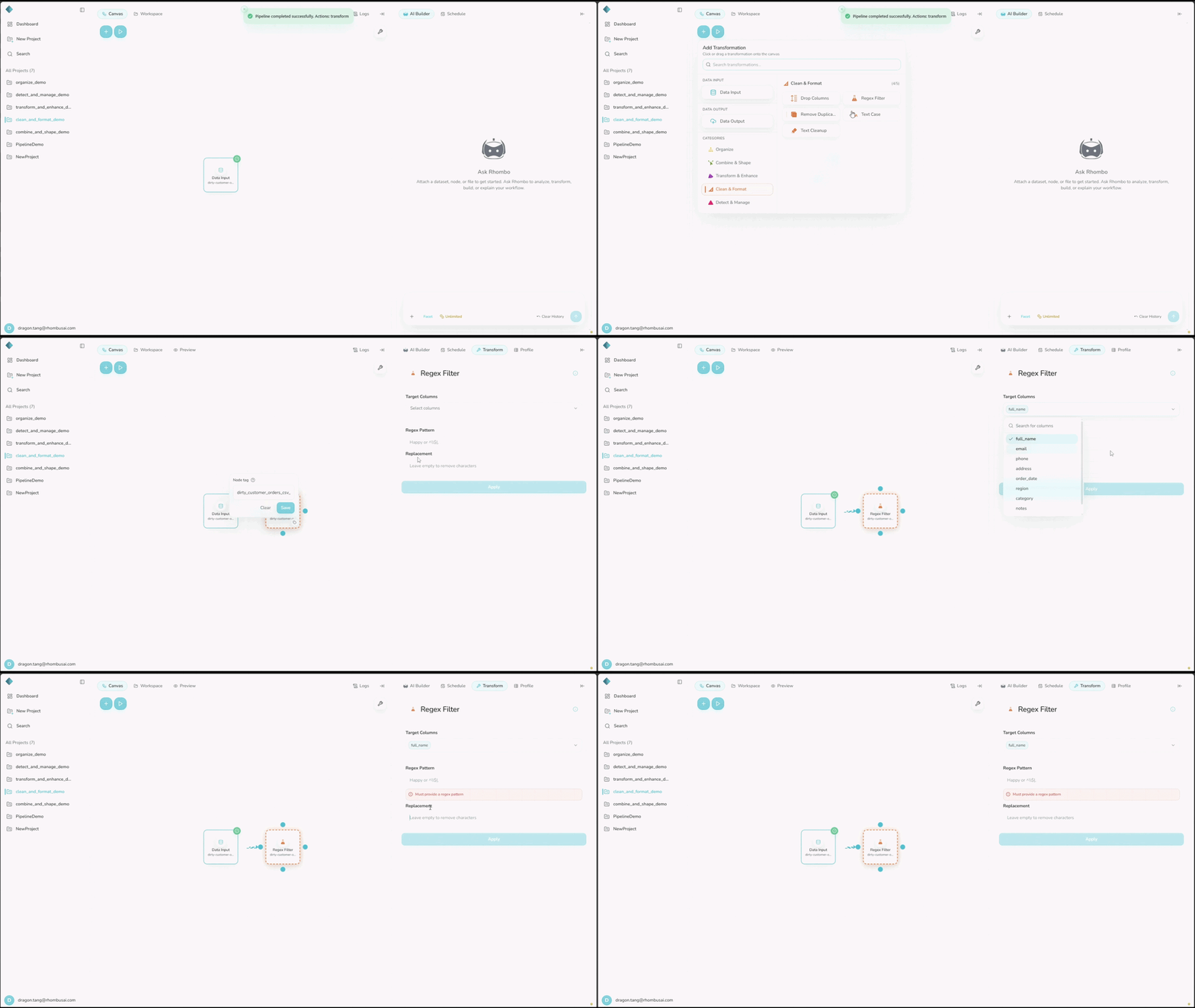
- Select Regex Filter from the transform menu.
- Select one or more text columns.
- Enter the regular expression in Regex Pattern.
- Enter a Replacement, or leave it empty to remove each match.
- Select Apply.
Configuration Options
Basic Options
- Select Column(s): Choose one or more text columns. The list includes only string columns.
- Regex Pattern: Enter the regular expression you want to match.
- Replacement: Enter plain text or a regex replacement string, including capture-group references. Leave this empty to remove matches. The workflow UI accepts strings only; callable replacement functions are available only to direct Python callers.
caution
The regex must consume at least one character. Standard execution rejects patterns that can match an empty string, such as .*, a*, or ^$; these patterns could replace text at every character boundary.
tip
Try an unfamiliar pattern on representative values before running it on the full dataset.
Examples
Example 1: Masking Phone Numbers
Input Dataset:
| Name | Phone |
|---|---|
| Alice | 123-456-7890 |
| Bob | (987) 654-3210 |
| Carol | 555.123.4567 |
Configuration:
- Select Column(s):
Phone - Regex Pattern:
\d - Replacement:
X
Result:
| Name | Phone |
|---|---|
| Alice | XXX-XXX-XXXX |
| Bob | (XXX) XXX-XXXX |
| Carol | XXX.XXX.XXXX |
Example 2: Standardizing Email Domains
Input Dataset:
| Employee | |
|---|---|
| John | john@oldomain.com |
| Sarah | sarah@anotherdomain.net |
| Mike | mike@olddomain.org |
Configuration:
- Select Column(s):
Email - Regex Pattern:
@.*$ - Replacement:
@newdomain.com
Result:
| Employee | |
|---|---|
| John | john@newdomain.com |
| Sarah | sarah@newdomain.com |
| Mike | mike@newdomain.com |
caution
Preview the result carefully. A broad pattern may replace more text than you intended.
Best Practices
- Use the narrowest practical pattern, and test edge cases such as nulls and empty strings.
- Keep the original column if you may need to compare or recover its values.
- Add a note for patterns that are difficult to understand from the node configuration alone.